
1. Establish a Dedicated and Optimized Workspace
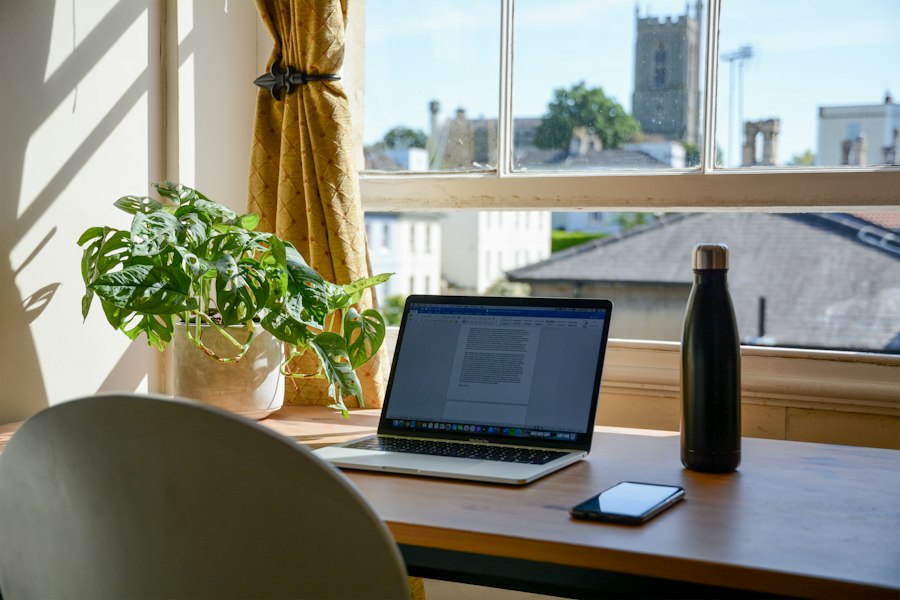
Teleworking success begins with an environment that encourages focus and productivity. For many people, the home is a place of relaxation and leisure, so it is essential to create a clear distinction between personal and work life. A dedicated workspace not only helps the mind “switch on” for professional tasks, but also sets important boundaries with other members of the household, minimizing interruptions and distractions. This space does not need to be a separate office with four walls and a door, although if you have that possibility, it is ideal. It can be a corner of a room, a desk in a less-trafficked room, or even a folding table to put away at the end of the day. The crucial thing is that it is a constant place, where every time you sit down, your brain associates that act with work. Consistency is key to establishing a routine and mental pattern.
1.1. Select the Right Location for your Home Office
Choosing the location is the first step. Look for an area that offers as much peace as possible. If you live with other people, consider proximity to high-traffic areas such as the kitchen or living room. Avoid areas where there are constant visual distractions, such as a window overlooking a busy street if you know you are easily distracted. Natural light is an important factor; Whenever possible, locate your desk near a window. Natural light not only improves mood and energy, but also reduces eye strain. If you don't have access to much natural light, invest in good artificial lighting, preferably with shades that simulate daylight and don't produce reflections on your screen. A well-lit environment is essential for long-term eye health and concentration. Additionally, evaluate the availability of outlets and the quality of the Wi-Fi signal in the chosen area. You don't want constant interruptions due to connectivity issues or having cables crossing the floor, which could create risks.
1.2. Organize your Desk to Maximize Productivity
Once you have selected your space, organization is essential. A cluttered desk can lead to a cluttered mind. Take time to organize your work tools efficiently. This includes keeping materials you use regularly, such as pens, notebooks, and important documents close at hand, while those you don't need as often can be stored in nearby drawers or shelves. Consider the ergonomics of your workplace. A comfortable and ergonomic chair is a worthwhile investment, since you will spend many hours sitting. Adjust the height of your chair and the position of your monitor so that your eyes are level with the top third of the screen, your feet are flat on the floor or on a footrest, and your wrists are straight when typing. Correct posture prevents back, neck and wrist pain, which can seriously affect your performance and long-term well-being. Use cable organizers to keep the area tidy and safe. Eliminate excessive personal items that may be a visual distraction. Remember that this is your workspace; It must be functional and promote concentration.
1.3. Minimize Distractions in your Work Environment
Even with the most dedicated space, distractions are inevitable. It is vital to be proactive to minimize them. If you have small children or pets, establish clear work schedules and talk to your family about the importance of respecting your time and space during those hours. You can use visual cues, such as a closed door or a "do not disturb" sign, to communicate when you are focused. Use noise-canceling headphones if household sounds are a problem. As for digital distractions, keep notifications from social media and personal apps muted on your phone and computer. Close browser tabs that are not relevant to your work. If possible, designate a “work mode” on your phone that only allows notifications from important calls or work apps. Consider using website blocking apps to limit access to sites that distract you during your work hours. Self-discipline is a muscón that is trained; The more you work to minimize distractions, the easier it will be to focus and maintain a consistent workflow.
2. Establish Clear Routines and Schedules

Structure is the anchor that keeps productivity afloat in teleworking. When you work from home, the line between work and personal life can become blurred, leading to excessively long hours or, conversely, a lack of motivation. Without the inherent structure of a traditional office (start and end times, scheduled meetings, interactions with colleagues), it's easy to fall into inconsistent patterns. Establishing clear routines and schedules is crucial to maintaining discipline, managing energy, and ensuring work is completed efficiently. A well-defined routine not only helps you start the day with purpose, but also allows you to know when to “switch off” and enjoy your free time, avoiding burnout.
2.1. Design a Fixed Work Schedule
Although flexibility is one of the advantages of teleworking, a fixed schedule provides the necessary structure. Define your start and end times, trying to make them consistent every day, as if you were going to an office. If your job allows, you can adjust these hours to better fit your circadian rhythm (for example, work later if you're more productive in the afternoon), but once established, stick to it. This schedule not only helps you, but also lets your colleagues and clients know when you are available, making collaboration and communication easier. Mark these times on your calendar and treat them with the same seriousness as you would if you had to travel to a physical office. Starting and ending your day at the same time creates a mental anchor, signaling to your brain when it's time to work and when it's time to rest.
2.2. Incorporate Regular Breaks and Personal Activities
Working non-stop for hours can be counterproductive. Research shows that regular breaks improve concentration, reduce stress, and prevent burnout. The Pomodoro technique, which involves working for 25 minutes and taking a 5-minute break, can be very effective. The important thing, however, is to find a rhythm that works for you. Schedule longer lunch breaks, where you step away from your desk and, if possible, go outside to get some fresh air. During these breaks, avoid work-related activities, such as checking emails. Instead, relax, stretch, do some light exercise, or interact with your family or pets.
In addition, it is essential to integrate personal and leisure activities into your daily routine. This can include time for physical exercise, hobbies, reading, or just quality time with loved ones. Knowing that you have these activities waiting for you at the end of the day can serve as excellent motivation and helps create a clear division between work and personal life. These activities are vital to your mental and physical well-being, and prevent the feeling that work consumes your entire life.
23. Create Start and End of the Day Rituals
Rituals can be powerful tools for mentally transitioning between different states. A ritual at the beginning of the day helps you "activate" the work mode. This could be something as simple as making yourself a cup of coffee or tea, reviewing your to-do list for the day, or taking a short walk before sitting down at your desk. The key is that it is a sequence of actions that you perform consistently before starting your first task. Similarly, an end-of-day ritual helps you “disconnect” from work. It might involve reviewing what you accomplished that day, briefly planning the next day's tasks, shutting down your computer, putting away your work tools, and then leaving your office space. This ritual signals to your brain that the work day is over, allowing you to relax and enjoy your personal time without the mental burden of work. Avoid the temptation to "check a last email" outside of your hours, as this can blur the line you've been trying to establish.
3. Master Digital Tools and Communication
In the teleworking environment, technology becomes your main ally and, often, your only connection with the team and clients. It is not enough to know how to use the tools; It is crucial to master them and understand how to use them effectively to optimize communication, collaboration and productivity. Poor digital communication can lead to misunderstandings, delays and a feeling of isolation. On the contrary, skillful use of digital platforms strengthens relationships, clarifies expectations, and keeps everyone informed and engaged.
3.1. Get familiar with Communication and Collaboration Platforms
Every company has its own preferred tools for communication and project management. It can be Slack for instant messaging, Microsoft Teams for meetings and document collaboration, Zoom for video conferencing, Trello or Asana for task management, or Google Workspace for shared documents. Your first step is to make sure you understand how each of these platforms works and what your team's expectations are for their use.
Don't limit yourself to the basic functions. Explore advanced features: keyboard shortcuts, integrations with other apps, search functions, notification settings, and customization options. For example, in Slack, learning how to create topical channels, use mentions to get the attention of specific people, or set reminders can greatly improve the efficiency of your communication. In video conferencing tools, mastering functions such as screen sharing, recording meetings, using breakout rooms or effectively muting the microphone is essential for a fluid and professional interaction. The key is to invest time in learning how to get the most out of each tool, which will allow you to work smarter, not just harder.
3.2. Develop Clear and Concise Written Communication Skills
When face-to-face communication is limited, written communication becomes of paramount importance. Email, chat messages, and comments on documents become your primary means of conveying ideas, giving instructions, and solving problems. Therefore, it is crucial to develop the ability to express yourself clearly, concisely and unambiguously.
- Be direct: Get to the point. In a remote work environment, people often scan messages, so make sure the main point is evident from the beginning.
- Use clear structures: Use short paragraphs, bullet points, and bold type to improve readability. If you need to explain something complex, break it down into smaller, more manageable points.
- Check before sending: Grammatical or spelling errors can undermine credibility. Take a moment to review your messages.
- Consider the tone: Without non-verbal cues, written tone can be easily misinterpreted. Try to be constructive and positive. If the topic is sensitive or complex, sometimes a quick call or video call is preferable to a long email exchange.
- Specify actions and deadlines: When you delegate tasks or request information, be explicit about what you need and when you need it.
Effective written communication reduces misunderstandings, saves time, and builds trust among team members.
3.3. Practice Netiquette and Video Conferencing Etiquette
Netiquette (netiquette) is a set of rules of behavior that govern online communication. When teleworking, it is essential to maintain a professional and respectful environment.
- Netiqueta in chat: Avoid using only capital letters (it is perceived as shouting). Be aware of the schedule when sending messages; If you send a message outside of business hours, don't expect an immediate response. Use emojis sparingly and only if the context and culture of your team allows it. Avoid gossip or personal discussions on public channels.
- Email Etiquette: Use clear and descriptive subject lines. Responds to emails in a timely manner. Avoid the “reply all” chain if it is not strictly necessary for all recipients.
- Video conferencing etiquette:
- Prepare your environment: Make sure your background is uncluttered and well lit. Avoid noisy or distracting backgrounds.
- Dress appropriately: Even if you are at home, it is a work meeting.
- Mute your microphone: Activate it only when you are going to speak to avoid background noise.
- Keep the camera on: Whenever possible and appropriate, activate your camera. This encourages connection and a sense of presence.
- Minimize distractions: Avoid looking at your phone or doing other tasks while you're on a call.
- Speak clearly and do not interrupt: Wait your turn to speak and make sure your voice is clear.
Mastering these practices not only makes you a more effective colleague, but also contributes to a positive and productive team culture in a remote environment.
He coworking It is an excellent option for those looking for a flexible workspace. Many people find in coworking an opportunity to network. The community of coworking encourages collaboration and creativity.
4. Encourage Active Connection and Collaboration
One of the biggest challenges of teleworking is the possible feeling of isolation and the difficulty in maintaining team cohesion. In an office, informal interactions (morning coffee, hallway conversation) contribute greatly to relationship building and the spontaneous exchange of ideas. In the remote environment, these interactions do not occur naturally and must be intentionally encouraged. Fostering connection and active collaboration is not only crucial for individual well-being, but also drives innovation, efficiency, and team morale.
4.1. Maintain Regular Contact with Colleagues and Superiors
Proactive communication is essential. Don't wait to be contacted; Be the one who initiates the contact. This doesn't mean filling your inbox with constant emails or messages, but rather establishing a routine of meaningful communication.
- Daily/weekly check-ins: Actively participates in scheduled team meetings. If your team doesn't have a daily or weekly check-in, suggest a short one where each person shares their priorities and any blockages. This helps keep everyone informed about progress and challenges.
- Proactive updates: Inform your team and manager about your progress on key tasks, especially if there are delays or if you need help. Transparency is vital in remote work.
- Ask and offer help: Don't hesitate to ask questions if you don't understand something or need clarification. Likewise, offer your help to your colleagues if you see that they are struggling or if you think you can add value.
- Stay visible: Participate in your company's general communication channels. Answer questions, share relevant resources, or simply engage in non-work-related conversations to maintain an active presence.
Regular, meaningful contact prevents feelings of isolation and ensures everyone feels part of the team.
4.2. Participate in Virtual Team Building Activities
To compensate for the lack of informal office interactions, it is important to create opportunities for online social connection. Many companies have implemented virtual team building activities to boost morale and camaraderie.
- Virtual cafes: Schedule coffee breaks or virtual lunches with colleagues, where the topic of conversation is not work. This can be as simple as a 15-minute video chat where you each share something about your weekend or a hobby.
- Virtual games and events: Host or participate in online game nights, trivia quizzes, virtual book clubs, or even virtual cooking or yoga classes. These recreational activities help release stress and get to know your colleagues in a different context.
- “Informal” chat channels: Create or join chat channels dedicated to non-work interests (pets, TV shows, sports, etc.). These channels allow spontaneous interactions and build bonds of camaraderie.
- Virtual celebrations: Make sure birthdays, work anniversaries, or other personal or professional milestones are recognized and celebrated virtually.
These interactions, although virtual, are crucial to building relationships, strengthening team culture, and making remote work feel less lonely.
4.3. Collaborate Effectively on Remote Projects
Effective collaboration on remote projects goes beyond simply using tools; It involves a specific mindset and approach.
- Sets clear expectations: When starting a project, make sure everyone understands the goals, roles, responsibilities, and deadlines. Document these decisions in a place accessible to the entire team.
- Use collaborative tools optimally: Take full advantage of co-editing capabilities in documents, spreadsheets, and presentations. This allows multiple people to work on the same file simultaneously, reducing the need for multiple versions and emails.
- Effective project meetings: Each meeting should have a clear agenda, a facilitator, and a recorder. Decisions and action items should be documented and shared after the meeting. Avoid unnecessary meetings; Sometimes a quick chat update or shared document is more efficient.
- Constant feedback: Provide and request feedback regularly and constructively. In a remote environment, it is easy for small problems to become magnified if they are not addressed in time. Feedback helps keep the project on track and improve team performance.
- Responsibility and monitoring: Make sure all team members are accountable for their tasks and that there is a clear system for tracking progress. Use project boards (like Trello or Asana) to visualize workflow and responsibilities.
Active, well-managed collaboration ensures that, despite physical distance, the team functions as a cohesive and productive unit.
5. Prioritize Personal Wellbeing and Mental Health
| Metric | Description | Valor | Unit |
|---|---|---|---|
| Percentage of employees teleworking | Proportion of workers who do their jobs from home | 45 | % |
| Average hours of teleworking per week | Average time an employee spends teleworking weekly | 30 | hours |
| Productivity increase | Percentage increase in productivity due to teleworking | 12 | % |
| Reduction of operating costs | Reduction in office expenses and services due to teleworking | 20 | % |
| Employee satisfaction | Percentage of employees satisfied with teleworking | 78 | % |
| Average daily connection time | Hours an employee is online and working remotely per day | 6 | hours |
Teleworking offers unmatched flexibility, but it can also blur the lines between work and personal life, often leading to longer work hours, increased stress, and decreased overall well-being. Without commuting to the office, social interactions, and physical separation from the workspace, it's easy to fall into burnout. Prioritizing personal well-being and mental health is not a luxury, but a fundamental necessity to maintain long-term productivity and enjoy a balanced life.
5.1. Maintain a Healthy Work-Life Balance
Establishing clear boundaries is the cornerstone of well-being while teleworking. Without a physical separation, it is your responsibility to create a mental and temporal separation.
- Digital Disconnection: Once your workday is over, close work applications, put away your computer, and avoid checking work emails or messages. Set a specific time to disconnect and stick to it. If you receive an out-of-hours notification, resist the temptation to respond immediately unless it's a genuine emergency.
- Time for Family and Friends: Spend intentional time with your loved ones. This can be a family dinner without work distractions, a phone call with friends, or joint recreational activities. Social interaction outside of work is vital for your mental health.
- Hobbies and Interests: Don't let work absorb all your hours. Maintain your hobbies and personal interests. Whether it's reading, exercising, cooking, painting, or learning something new, these activities provide an escape, stimulate your mind in different ways, and recharge you.
- «Vacation» at home: If you can't take time off to travel, at least take a "vacation" at home. Completely disconnect from work, explore your city, relax and recharge your batteries. Rest is as productive as work.
Work-life balance is not something you achieve once and stick with; It is an ongoing effort that requires self-awareness and constant adjustment.
5.2. Incorporates Physical Activity and Adequate Nutrition
A sedentary life is an inherent risk of teleworking. Lack of a daily commute and proximity to the refrigerator can negatively impact your physical and mental health.
- Regular Physical Activity: Schedule exercise into your day. It doesn't have to be an intense gym session; Even a brisk walk, a yoga session at home, or a stretching routine can make a big difference. Break up your work breaks to move around: stretch, do some squats, or go up and down stairs. Exercise not only improves cardiovascular and muscular health, but it is also a powerful antidepressant and stress reducer.
- Ergonomics: Make sure your workspace is ergonomic (as mentioned in point 1.2). A suitable chair, a correct monitor height and good posture prevent pain and injuries. Consider a standing desk if possible, or at least alternate between sitting and standing throughout the day.
- Conscious Nutrition: It's easy to constantly snack when the kitchen is just a few steps away. Plan your meals and snacks. Opt for nutritious foods that give you sustained energy instead of sugar spikes followed by crashes. Drink enough water throughout the day to stay hydrated. Avoid eating in front of the computer; Use your lunch hour to eat somewhere else and unwind.
Taking care of your body not only improves your physical health, but also has a direct impact on your mental ability to focus and perform.
5.3. Pay Attention to Your Mental and Emotional Health
Isolation, lack of social interaction, and pressure to be productive can significantly impact mental health when working remotely.
- Recognize the Signs: Learn to identify signs of stress, anxiety, or burnout, such as constant fatigue, irritability, difficulty concentrating, sleep problems, or loss of interest in activities you previously enjoyed.
- Maintain Social Connection: In addition to virtual team building activities, make an effort to maintain your personal social circles. Schedule video calls with friends and family, or participate in community activities (conditions permitting). Human interaction is essential.
- Mindfulness and Relaxation Practices: Incorporate practices such as meditation, deep breathing or journaling into your routine. These techniques can help you manage stress, improve self-awareness, and promote calm.
- Seek Professional Help: If you feel that stress or anxiety is significantly affecting your daily life and your ability to function, do not hesitate to seek support from a mental health professional. Many therapies are now offered virtually, making them more accessible. Your mental well-being is as important as your physical well-being.
- Be Flexible with Yourself: There will be good days and bad days. Be kind to yourself. If one day you are not as productive as you would like, recognize that it is normal and do not beat yourself up for it. Learn from the experience and look for how to improve the next day.
Prioritizing your personal well-being and mental health is the foundation on which you will build a successful and sustainable career in teleworking. Without a healthy, balanced you, no amount of productivity tips or tech tools will be able to keep you afloat in the long term.

Work at your pace
FAQs
What is teleworking?
Teleworking is a work modality that allows employees to perform their tasks from a place other than the office, generally from home, using technological tools to communicate and collaborate with the work team.
What are the advantages of teleworking?
Some advantages of teleworking include greater flexibility in schedules, saving time and money on travel, better work-life balance, reduced stress, and increased productivity in some cases.
What are the challenges of teleworking?
Some challenges of teleworking may include difficulty separating work from personal life, feelings of isolation, lack of direct supervision, difficulty establishing boundaries between work and rest, and the need for a good internet connection and a suitable space to work from home.
What tools are necessary for teleworking?
For teleworking, it is necessary to have tools such as a computer or laptop, quality internet access, communication programs such as Skype or Zoom, project management tools such as Trello or Asana, and possibly a mobile phone to always be available.
How can you stay productive while working from home?
To maintain productivity while working from home, it is important to establish a defined work schedule, create a comfortable workspace free of distractions, set daily or weekly goals, maintain fluid communication with the team, and take regular breaks to avoid fatigue and burnout.